

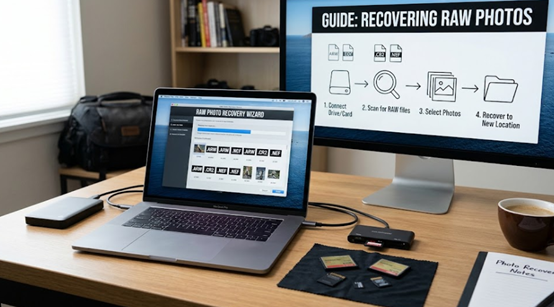
For photographers, no file loss hurts like losing RAW photos. A RAW file is the digital negative – every bit of data your camera sensor captured, before any processing. Unlike JPGs, which are compressed and processed in-camera, RAW files hold the full image information. Losing them means losing the ability to re-edit, recover highlights, and produce the final image you envisioned.
The good news: RAW files are recoverable, and with the right data recovery tool, most photographers can get them back even after deletion or formatting. Here is a complete guide to RAW photo recovery.
Why RAW Recovery Is Different
RAW files present unique recovery challenges:
They use camera-specific formats. Canon uses CR2 and CR3, Nikon uses NEF, Sony uses ARW, Fujifilm uses RAF, and Panasonic uses RW2. Recovery software must recognize all of them.
They are large. A single RAW file can be 30-80MB, meaning fewer files fit on a card and fragmentation is more common.
They need accurate previews. A recovery tool that cannot render RAW thumbnails forces you to guess what you are recovering.
A tool built for photographers handles all three. A generic tool that only knows JPG will either miss RAW files or show blank previews.
Where RAW Photos Get Lost
RAW photos are most commonly lost in three scenarios:
1. Accidental deletion – formatting a card in-camera without checking, or deleting files thinking they were backed up.
2. Card corruption – a damaged file system makes the RAW files invisible.
3. Camera or card failure – a card error mid-shoot, or a reformat after a “low disk” warning.
In each case, the RAW data is usually still on the card – the file system reference is what is missing.
Step-by-Step: Recover RAW Photos with Recoverit
Wondershare Recoverit supports 16-bit RAW and ProRes formats, making it a practical choice for photographers shooting Canon, Nikon, Sony, Fujifilm, and other systems.
Step 1 – Connect the Card and Select the Recovery Mode
Connect your memory card through a card reader and launch Recoverit. Choose SD Card Recovery (for cards) or select the drive directly (for RAW files stored on a computer or external drive). AI-boosted device recognition identifies your camera’s card and prepares the right scan.
Step 2 – Run the Scan
Click Scan. Recoverit’s AI-accelerated scanning rebuilds device-specific file patterns and locates RAW files by their signatures – CR2, NEF, ARW, RAF, and more – even when the file system no longer lists them. Large RAW libraries can take longer to scan; the tool shows results in real time so you can stop early if you find your files.
Step 3 – Filter and Preview RAW Files
When the scan completes, filter by file type to show only images, or search by extension like “.CR2” or “.NEF”. Preview each RAW file – Recoverit renders RAW thumbnails accurately, so you can confirm image quality before recovering. This is the step most generic tools fail: they show blank placeholders for RAW files, forcing photographers to recover blindly.
Step 4 – Recover to a Safe Location
Select the RAW files you want and click Recover. Save them to a different drive than the source – never back onto the same card. After recovery, back the files up immediately; RAW files are too valuable to leave in a single location.
The Camera Angle
If your RAW files were lost from a camera’s memory card, the camera data recovery covers the workflow for camera-specific storage, and the SD card recovery handles the card itself. Both support the same RAW formats.
Recovering RAW Files after Formatting
Formatting a card in-camera is the most common RAW loss scenario – and the most recoverable one. In-camera formatting usually performs a quick format, which clears the file system index but leaves the RAW data on the card. As long as you stop shooting immediately, a deep scan can rebuild the index and bring the RAW files back.
The mistake that ruins this: continuing to shoot after formatting. Every new photo writes over old data. If you formatted by accident, remove the card at once and scan it.
Protecting Your RAW Files
· Shoot to two cards if your camera supports dual slots.
· Back up RAW files after every shoot – to an external drive, a NAS, or cloud storage.
· Label your cards so you never reformat one with unbacked-up work.
· Format in-camera, not on a computer Camera formatting matches the camera’s file system.
· Replace aging cards. A card that has served years of shoots is more likely to fail.
Conclusion
RAW photos are recoverable – the format is different, but the recovery principles are the same: stop using the card, scan read-only, and use a tool that understands your files. Wondershare Recoverit supports 16-bit RAW and ProRes formats, renders accurate previews, and recovers from cards and drives alike. When you recover RAW photos, the digital negatives you thought were gone can be back on your drive within minutes – and your edits can continue where they left off.
